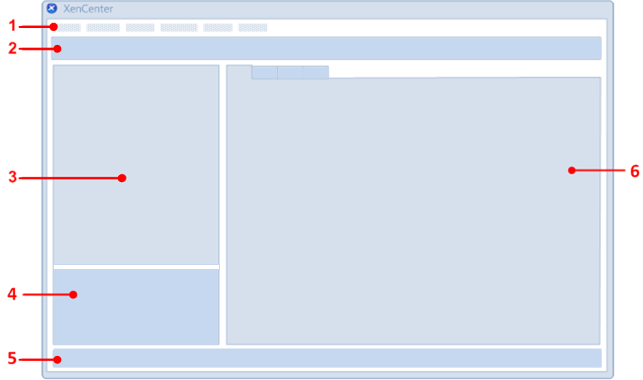
| 1 |
Menu bar |
Includes all the commands you need to manage servers, pools, SRs, VMs, and templates. |
| 2 |
Toolbar |
Provides quick access to a subset of the most frequently used menu commands. See The Toolbar. |
| 3 |
Resources pane |
Lists the servers, pools, VMs, templates, and SRs currently being managed from XenCenter. See The Resources Pane |
| 4 |
Navigation pane |
Lists the navigation buttons. Click a button to see a corresponding view of the managed resources in the resources pane. |
| 5 |
Status bar |
Displays progress information about the current task. |
| 6 |
Properties tabs |
View and set properties for the selected resource. See The Tabs. |