-
-
NUMA optimization
This content has been machine translated dynamically.
Dieser Inhalt ist eine maschinelle Übersetzung, die dynamisch erstellt wurde. (Haftungsausschluss)
Cet article a été traduit automatiquement de manière dynamique. (Clause de non responsabilité)
Este artículo lo ha traducido una máquina de forma dinámica. (Aviso legal)
此内容已经过机器动态翻译。 放弃
このコンテンツは動的に機械翻訳されています。免責事項
이 콘텐츠는 동적으로 기계 번역되었습니다. 책임 부인
Este texto foi traduzido automaticamente. (Aviso legal)
Questo contenuto è stato tradotto dinamicamente con traduzione automatica.(Esclusione di responsabilità))
This article has been machine translated.
Dieser Artikel wurde maschinell übersetzt. (Haftungsausschluss)
Ce article a été traduit automatiquement. (Clause de non responsabilité)
Este artículo ha sido traducido automáticamente. (Aviso legal)
この記事は機械翻訳されています.免責事項
이 기사는 기계 번역되었습니다.책임 부인
Este artigo foi traduzido automaticamente.(Aviso legal)
这篇文章已经过机器翻译.放弃
Questo articolo è stato tradotto automaticamente.(Esclusione di responsabilità))
Translation failed!
NUMA optimization in XenServer 9
Overview
Non-Uniform Memory Access (NUMA) is a multiprocessor memory architecture in which memory is divided into nodes attached to specific CPU sockets. Accessing memory on the local NUMA node has lower latency than accessing memory on a remote node. When VM vCPUs and their memory are co-located on the same NUMA node, workloads can achieve lower memory-access latency and better performance.
UMA and NUMA compared
- UMA (Uniform Memory Access) hosts present a single physical memory node to CPUs.
- NUMA hosts expose multiple memory nodes. CPUs have lower latency when accessing memory from their local node than from remote nodes.
Benefits of optimized NUMA placement
- Improved application responsiveness and workload throughput.
- Higher VM density per host, reducing the need for additional hosts and overall infrastructure cost.
Limitations
- If no single NUMA node on a host has enough free memory for a VM, XS9 starts the VM with memory spread across multiple nodes to allow the VM to start.
- When memory is spread, the VM uses multiple NUMA nodes (
NUMA nodes > 1) and is not NUMA-optimized. - Performance improvements vary by workload, benchmark, and CPU type.
Monitor and troubleshoot
Per-VM RRD metrics (disabled by default) help monitor NUMA behavior and vCPU scheduling.
Metrics
-
NUMA nodes (
numa_nodes): Number of NUMA nodes used by the VM. Value 1 indicates optimized; values greater than 1 indicate not optimized. -
Memory NUMA node X (
memory_numa_node_X): Amount of VM memory allocated from physical NUMA node X. Value 0 means no memory from that node. -
vCPUs runnable any (
runnable_any): Percentage of time at least one vCPU is ready but no pCPU is available. This is an early indicator of CPU contention. -
vCPUs runnable sum (
runnable_vcpus): Expected percentage slowdown across all vCPUs due to scheduling delays. -
NUMA non-affine vCPUs (
numa_node_nonaffine_vcpus): Percentage of time vCPUs run on pCPUs that are not in the same NUMA node as the VM memory. Higher values indicate increased memory-access latency.
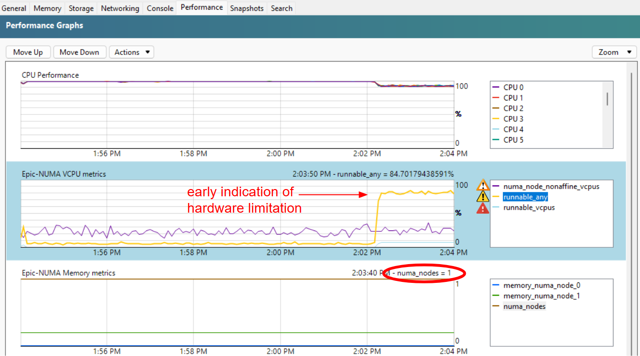
Debug checklist
- Check
NUMA nodesto see how many NUMA nodes the VM uses. - Check
vCPUs runnable anyfor domain-level scheduling contention. - Check
vCPUs runnable sumfor vCPU-level scheduling delays. - Check
NUMA non-affine vCPUsfor NUMA affinity violations and related latency.
Enable metrics and export samples
Per-VM RRD metrics are disabled by default. To enable a metric (for example, runnable_any) for a VM and export a sample:
# Enable the data source for a VM
xe vm-data-source-record uuid=<vm-uuid> data-source=runnable_any

# Export sample RRD output
rrd2csv VM:AVERAGE::runnable_any
<!--NeedCopy-->
Configure NUMA placement (xe CLI)
NUMA placement optimization is enabled by default on XS9 hosts. No action is required to turn it on.
To disable NUMA placement optimization on a host, set the host NUMA affinity policy to any.
# View current policy
xe host-param-get uuid=<host-uuid> param-name=numa-affinity-policy

# Disable optimization
xe host-param-set uuid=<host-uuid> numa-affinity-policy=any

# Verify
xe host-param-get uuid=<host-uuid> param-name=numa-affinity-policy
<!--NeedCopy-->
When enabled by default, the policy value is default_policy. When disabled, the value is any.
Share
Share
In this article
This Preview product documentation is Cloud Software Group Confidential.
You agree to hold this documentation confidential pursuant to the terms of your Cloud Software Group Beta/Tech Preview Agreement.
The development, release and timing of any features or functionality described in the Preview documentation remains at our sole discretion and are subject to change without notice or consultation.
The documentation is for informational purposes only and is not a commitment, promise or legal obligation to deliver any material, code or functionality and should not be relied upon in making Cloud Software Group product purchase decisions.
If you do not agree, select I DO NOT AGREE to exit.