
NUMA optimization in XenServer 9
Overview
Non-Uniform Memory Access (NUMA) is a multiprocessor memory architecture in which memory is divided into nodes attached to specific CPU sockets. Accessing memory on the local NUMA node has lower latency than accessing memory on a remote node. When VM vCPUs and their memory are co-located on the same NUMA node, workloads can achieve lower memory-access latency and better performance.
UMA and NUMA compared
-
UMA (Uniform Memory Access) hosts present a single physical memory node to CPUs.
-
NUMA hosts expose multiple memory nodes. CPUs have lower latency when accessing memory from their local node than from remote nodes.
Benefits of optimized NUMA placement
-
Improved application responsiveness and workload throughput.
-
Higher VM density per host, reducing the need for additional hosts and overall infrastructure cost.
Limitations
-
If no single NUMA node on a host has enough free memory for a VM, XS9 starts the VM with memory spread across multiple nodes to allow the VM to start.
-
When memory is spread, the VM uses multiple NUMA nodes (
NUMA nodes > 1) and is not NUMA-optimized. -
Performance improvements vary by workload, benchmark, and CPU type.
Monitor and troubleshoot
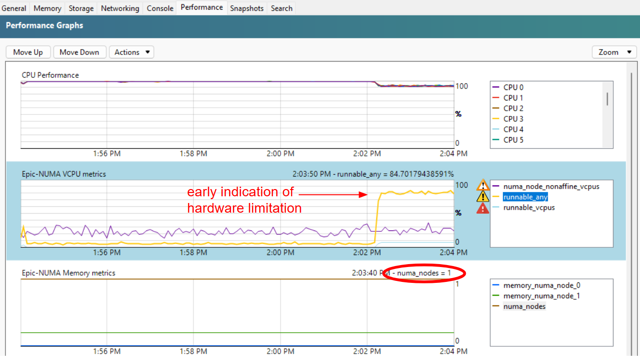
Per-VM RRD metrics (disabled by default) help monitor NUMA behavior and vCPU scheduling.
Metrics
-
NUMA nodes (
numa_nodes): Number of NUMA nodes used by the VM. Value 1 indicates optimized; values greater than 1 indicate not optimized. -
Memory NUMA node X (
memory_numa_node_X): Amount of VM memory allocated from physical NUMA node X. Value 0 means no memory from that node. -
vCPUs runnable any (
runnable_any): Percentage of time at least one vCPU is ready but no pCPU is available. This is an early indicator of CPU contention. -
vCPUs runnable sum (
runnable_vcpus): Expected percentage slowdown across all vCPUs due to scheduling delays. -
NUMA non-affine vCPUs (
numa_node_nonaffine_vcpus): Percentage of time vCPUs run on pCPUs that are not in the same NUMA node as the VM memory. Higher values indicate increased memory-access latency.
Debug checklist
-
Check
NUMA nodesto see how many NUMA nodes the VM uses. -
Check
vCPUs runnable anyfor domain-level scheduling contention. -
Check
vCPUs runnable sumfor vCPU-level scheduling delays. -
Check
NUMA non-affine vCPUsfor NUMA affinity violations and related latency.
Enable metrics and export samples
Per-VM RRD metrics are disabled by default. To enable a metric (for example,
runnable_any) for a VM and export a sample:
# Enable the data source for a VM
 xe vm-data-source-record uuid=<vm-uuid> data-source=runnable_any

 # Export sample RRD output
 rrd2csv VM:AVERAGE::runnable_any
Configure NUMA placement (xe CLI)
NUMA placement optimization is enabled by default on XS9 hosts. No action is required to turn it on.
To disable NUMA placement optimization on a host, set the host NUMA affinity policy to
any.
# View current policy
 xe host-param-get uuid=<host-uuid> param-name=numa-affinity-policy

 # Disable optimization
 xe host-param-set uuid=<host-uuid> numa-affinity-policy=any

 # Verify
 xe host-param-get uuid=<host-uuid> param-name=numa-affinity-policy
When enabled by default, the policy value is
default_policy. When disabled, the value is any.