
Storage multipathing
Dynamic multipathing support is available for Fibre Channel and iSCSI storage back-ends.
XenServer® uses Linux native multipathing (DM-MP), the generic Linux multipathing solution, as its multipath handler. However, XenServer supplements this handler with additional features so that XenServer can recognize vendor-specific features of storage devices.
Configuring multipathing provides redundancy for remote storage traffic if there is partial connectivity loss. Multipathing routes storage traffic to a storage device over multiple paths for redundancy and increased throughput. You can use up to 16 paths to a single LUN. Multipathing is an active-active configuration. By default, multipathing uses either round-robin or multibus load balancing depending on the storage array type. All routes have active traffic on them during normal operation, which results in increased throughput.
Important:
We recommend that you enable multipathing for all hosts in your pool before creating the SR. If you create the SR before enabling multipathing, you must put your hosts into maintenance mode to enable multipathing.
NIC bonding can also provide redundancy for storage traffic. For iSCSI storage, we recommend configuring multipathing instead of NIC bonding whenever possible.
Multipathing is not effective in the following scenarios:
-
NFS storage devices
-
You have limited number of NICs and need to route iSCSI traffic and file traffic (NFS or SMB) over the same NIC
In these cases, consider using NIC bonding instead. For more information about NIC bonding, see Networking.
Prerequisites
Before enabling multipathing, verify that the following statements are true:
-
Multiple targets are available on your storage server.For example, an iSCSI storage back-end queried for
sendtargetson a given portal returns multiple targets, as in the following example:iscsiadm -m discovery --type sendtargets --portal 192.168.0.161
192.168.0.161:3260,1 iqn.strawberry:litchie
192.168.0.204:3260,2 iqn.strawberry:litchie -
For iSCSI only, the control domain (dom0) has an IP address on each subnet used by the multipathed storage.Ensure that for each path you want to have to the storage, you have a NIC and that there is an IP address configured on each NIC. For example, if you want four paths to your storage, you must have four NICs that each have an IP address configured.
-
For iSCSI only, every iSCSI target and initiator has a unique IQN.
-
For iSCSI only, the iSCSI target ports are operating in portal mode.
-
For HBA only, multiple HBAs are connected to the switch fabric.
-
When you are configuring secondary interfaces, each secondary interface must be on a separate subnet. For example, if you want to configure two more secondary interfaces for storage, you require IP addresses on three different subnets – one subnet for the management interface, one subnet for Secondary Interface 1, and one subnet for Secondary Interface 2.
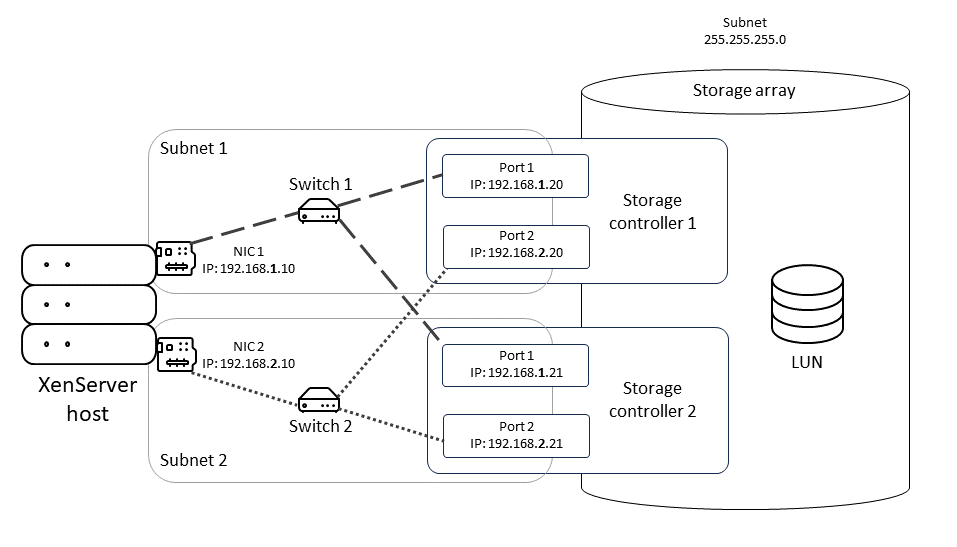 This diagram shows how both NICs on the host in a multipathed iSCSI configuration must be on different subnets. In this diagram, NIC 1 on the host along with Switch 1 and NIC 1 on both storage controllers are on a different subnet than NIC2, Switch 2, and NIC 2 on the storage controllers.
Enable multipathing
You can enable multipathing in XenCenter® or on the xe CLI.
To enable multipathing by using XenCenter
-
In the XenCenter Resources pane, right-click on the host and choose Enter Maintenance Mode.
-
Wait until the host reappears in the Resources pane with the maintenance mode icon (a blue square) before continuing.
-
On the General tab for the host, click Properties and then go to the Multipathing tab.
-
To enable multipathing, select the Enable multipathing on this server check box.
-
Click OK to apply the new setting. There is a short delay while XenCenter saves the new storage configuration.
-
In the Resources pane, right-click on the host and choose Exit Maintenance Mode.
-
Repeat these steps to enable multipathing on all hosts in the pool.
Ensure that you enable multipathing on all hosts in the pool. All cabling and, in the case of iSCSI, subnet configurations must match the corresponding NICs on each host.
To enable multipathing by using the xe CLI
-
Open a console on the XenServer host.
-
Unplug all PBDs on the host by using the following command:
xe pbd-unplug uuid=<pbd_uuid>You can use the commandxe pbd-listto find the UUID of the PBDs. -
Set the value of the
multipathingparameter totrueby using the following command:xe host-param-set uuid=<host uuid> multipathing=true -
If there are existing SRs on the server running in single path mode but that have multiple paths:
-
Migrate or suspend any running guests with virtual disks in affected the SRs
-
Replug the PBD of any affected SRs to reconnect them using multipathing:
xe pbd-plug uuid=<pbd_uuid>
-
-
Repeat these steps to enable multipathing on all hosts in the pool.
Ensure that you enable multipathing on all hosts in the pool. All cabling and, in the case of iSCSI, subnet configurations must match the corresponding NICs on each host.
Disable multipathing
You can disable multipathing in XenCenter or on the xe CLI.
To disable multipathing by using XenCenter
-
In the XenCenter Resources pane, right-click on the host and choose Enter Maintenance Mode.
-
Wait until the host reappears in the Resources pane with the maintenance mode icon (a blue square) before continuing.
-
On the General tab for the host, click Properties and then go to the Multipathing tab.
-
To disable multipathing, clear the Enable multipathing on this server check box.
-
Click OK to apply the new setting. There is a short delay while XenCenter saves the new storage configuration.
-
In the Resources pane, right-click on the host and choose Exit Maintenance Mode.
-
Repeat these steps to configure multipathing on all hosts in the pool.
To disable multipathing by using the xe CLI
-
Open a console on the XenServer host.
-
Unplug all PBDs on the host by using the following command:
xe pbd-unplug uuid=<pbd_uuid>You can use the commandxe pbd-listto find the UUID of the PBDs. -
Set the value of the
multipathingparameter tofalseby using the following command:xe host-param-set uuid=<host uuid> multipathing=false -
If there are existing SRs on the server running in single path mode but that have multiple paths:
-
Migrate or suspend any running guests with virtual disks in affected the SRs
-
Unplug and replug the PBD of any affected SRs to reconnect them using multipathing:
xe pbd-plug uuid=<pbd_uuid>
-
-
Repeat these steps to disable multipathing on all hosts in the pool.
Configure multipathing
To make additional temporary multipath configuration modifications, create files with the suffix
.conf in the directory /etc/multipath/conf.d. Add the additional configuration in these files. Multipath searches the directory alphabetically for files ending in .conf and reads configuration information from them.
Do not edit the file
/etc/multipath.conf. This file is overwritten by updates to XenServer. If you want to make permanent changes to your multipathing configuration, contact your storage vendor who can request our partner engineering team to have the changes permanently added.